✦ On-device AI · Built for macOS 26

Your clipboard,
with a brain.

Cortex remembers everything you copy — and actually understands it. Summaries, intents and structure, powered by Apple Intelligence. Entirely on your Mac. Entirely yours.

Free for early birds — core features are a lifetime purchase, never a subscription · macOS 26+ · Apple Silicon · No account, no cloud

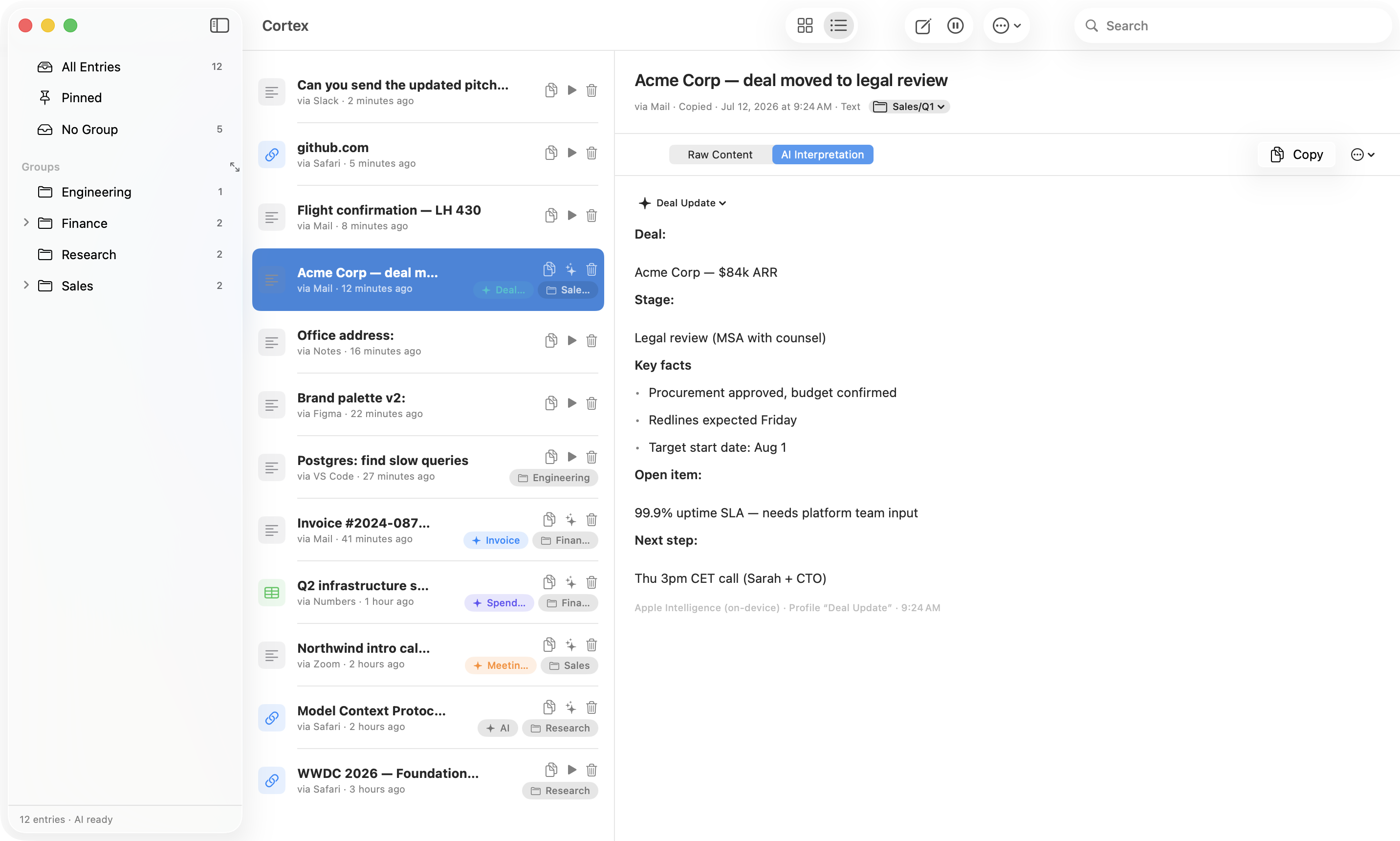
Cortex main window

Keyboard-first, from the first keystroke

Open picker⌘⇧V Paste top hits⌘1–9 Run AI⌘K File into a group⌘⇧G Every shortcut⌘?

Copy once. Find it forever.

Cortex quietly captures what you copy — and turns a flat history into an organized, searchable library.

Total recall

Text, links, tables, images, files — everything lands in your history with its source app and timestamp. Duplicates get bumped, not duplicated.

AI that gets it

Copied an invoice? Cortex extracts the fields. A rambling deal email? You get the stage, the numbers and the next step. On-device, in seconds.

Groups, not chaos

File entries into nested groups like Sales/Q1 with one hotkey. Your clipboard becomes a knowledge base instead of a junk drawer.

👁

Reads images & PDFs

Built-in OCR turns screenshots into searchable text. PDFs and Word documents resolve to clean text automatically — scans included.

Plain Markdown, forever

Every entry is a human-readable Markdown file in a folder you choose. Sync it with iCloud, grep it, version it. No lock-in, ever.

Talks to Claude

Cortex ships an MCP server: Claude Desktop and other AI tools can search, read and organize your clipboard library — with your permission.

Paste at the speed of thought.

Hit ⌘⇧V anywhere. Type three letters. Hit . Done — the picker finds it, pastes it and gets out of your way.

  • Fuzzy full-text search across content, titles, groups and AI summaries
  • Arrow keys + Enter — the entry you pick jumps back to the top of your history
  • ⌘1–9 pastes your most recent items instantly
  • ← → flips between raw content and the AI interpretation
  • ⌘? shows every shortcut, right inside the picker
Cortex picker
Shortcut overlay

Never leave the keyboard. Never read a manual.

Cortex is designed hands-on-keys: global hotkeys for capturing, grouping and pasting — and a built-in cheat sheet so you never have to memorize them.

  • ⌘⇧G files your latest copy into a group — add and the AI pipeline runs on it too
  • ⌘O jumps from the picker straight into the main window
  • Direct paste optionally sends ⌘V into the app you came from
  • Long content? Cortex splits it, processes every part and merges the result — no “content too long” dead ends

Private by architecture, not by promise.

Your clipboard is the most sensitive data stream on your Mac. Cortex treats it that way: there is no server, no account, no telemetry — because there’s simply no code for any of it.

Read the full privacy policy →

  • 100% on-device AI — Apple Intelligence, no cloud round-trips
  • Password managers are never captured — concealed content is respected, always
  • Pause anytime — 15 minutes, an hour, or until you say so
  • Your files, your folder — plain Markdown you can read, move and delete

Built by real people. Answered by real people.

No anonymous corporation, no support bots. Cortex is built in Paderborn by two people who use it every single day — and read every email themselves.

Daniel Pudelko

Daniel Pudelko

Founder of Techmanufaktur · Product & Ideas

Drives the product ideas behind Cortex — from the clipboard as a knowledge base to the AI pipeline. Believes your data belongs in files you own, not in someone else’s database.

hello@techmanufaktur.de
Clemens

Clemens

Founder of Techmanufaktur · Implementation & Engineering

Turns those ideas into code — from the capture engine to the on-device AI. Pushes every build to its limits before you ever see it.

hello@techmanufaktur.de

“A clipboard manager sees everything you copy. You should know exactly who builds it — and be able to write to them.” — Daniel

Questions, answered.

Does my clipboard data ever leave my Mac?

No. Capture, search, OCR and AI all run locally. The only network access Cortex has is fetching link previews when you copy a URL — and you can turn that off.

What does the AI actually do?

You define “intents” — situations like Invoice or Deal Update with a prompt each. When you run AI on an entry, Cortex detects the matching intent and applies your prompt: extract fields, summarize, translate, reformat. All with Apple’s on-device foundation model.

What are the system requirements?

macOS 26 or later on Apple Silicon. AI features require Apple Intelligence to be enabled; everything else works without it.

Where is my data stored?

As Markdown files (plus attachments) in a folder you control. Point it at iCloud Drive and your library syncs across Macs — no proprietary database involved.

How does the Claude / MCP integration work?

Cortex includes a small MCP server binary. Add one snippet to your Claude Desktop config, and Claude can list, search, read, create and organize entries in your library. It runs locally over stdio.

Is Cortex free?

Right now, yes: the early-bird release is 100% off. And here’s the promise — core functionality is a one-time lifetime purchase, never a subscription. What you get today stays yours. Much further down the road, a subscription may be offered for optional premium add-ons only.
Stop losing what you copy.

Cortex is the memory your Mac was missing.

Download for macOS